
Welcome, fellow craft enthusiasts! We are absolutely thrilled to share our exciting journey with the revolutionary Cricut Maker. Having heard countless impressive things about this machine, we jumped at the opportunity to put it to the test, and it certainly did not disappoint. In this comprehensive guide, we’ll dive deep into the Cricut Maker’s capabilities, explore its transformative power for DIY projects, and walk you through three simple yet stunning creations that truly showcase its versatility. Before we unveil all the fantastic details, make sure to check out our video demonstration to see the Cricut Maker in action!
Isn’t that machine just incredible? Its precision, speed, and ability to handle an astonishing array of materials set it apart from anything we’ve encountered. For those eager to delve further into its extensive features and specifications, we highly recommend visiting THIS OFFICIAL CRICUT MAKER PAGE. It’s packed with valuable insights that will help you fully appreciate what this powerhouse machine can do. Throughout our time with the Cricut Maker, we crafted some of the cutest, most personalized projects, proving that professional-grade results are accessible to everyone.
Unleash Your Creativity: Introducing the Cricut Maker
The Cricut Maker is more than just a cutting machine; it’s a creative hub that empowers crafters, DIY enthusiasts, and even small business owners to bring their visions to life with unparalleled precision and ease. Equipped with advanced tools like the Rotary Blade and Knife Blade, it can effortlessly cut through hundreds of materials, from delicate tissue paper and intricate fabrics to sturdy basswood and genuine leather. This versatility eliminates the need for multiple specialized machines, streamlining your workspace and expanding your creative horizons exponentially. Whether you’re customizing apparel, personalizing home decor, or crafting intricate paper designs, the Cricut Maker offers a seamless and intuitive experience, primarily through its user-friendly Design Space software.
Project 1: Elegant Faux Tin Barnwood Frame Art
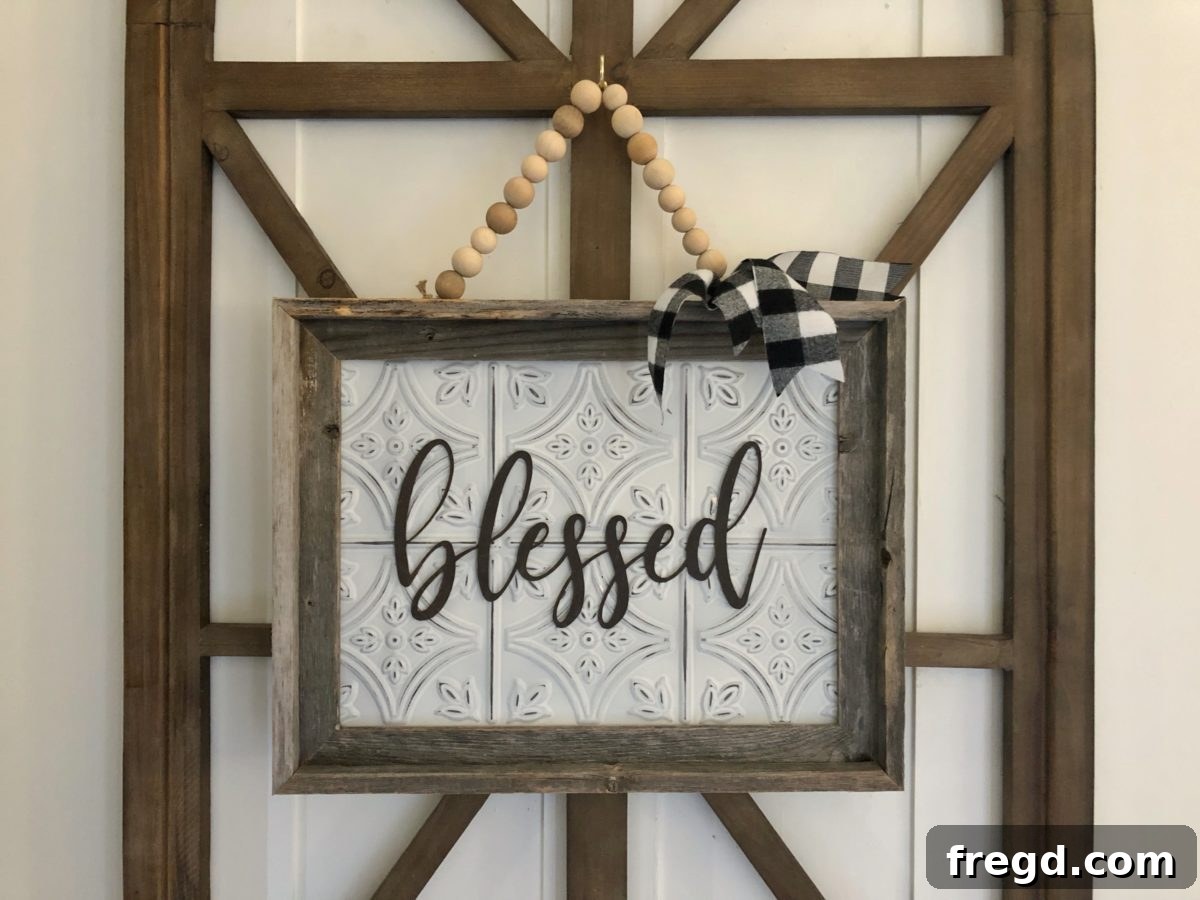
Our first project, a beautiful barnwood frame adorned with faux tin and intricate basswood cutouts, perfectly illustrates the Cricut Maker’s capacity for detailed craftsmanship. This piece brings rustic charm and sophisticated elegance to any space.
Materials Needed:
- A simple barnwood frame (easily found at local craft stores)
- 1/4″ plywood cut to fit the frame opening
- Faux tin panel (you can find similar panels HERE)
- Basswood (for cutting intricate designs)
- Hot glue
- Ribbon and wood beads for embellishment
Step-by-Step Creation:
- Prepare the Base: Begin by cutting a piece of 1/4″ plywood to precisely fit the opening of your barnwood frame. This will serve as the sturdy backing for your artwork.
- Attach Faux Tin: Next, cut your faux tin panel to the exact same size as the plywood. Using hot glue, securely attach the faux tin to the plywood panel. This creates a visually stunning textured background.
- Assemble the Frame: Carefully glue the assembled faux tin and plywood panel into the inside of the barnwood frame. Ensure it’s centered and secure.
- Cricut Maker’s Magic – Basswood Cutting: This is where the Cricut Maker truly shines. Using the Knife Blade (designed for thicker materials), we precisely cut intricate designs and lettering from basswood. The Maker handles basswood with remarkable accuracy, allowing for complex patterns that would be incredibly difficult, if not impossible, to achieve by hand. We sourced a beautiful farmhouse-inspired design from Cricut Design Space, customizing it to fit our frame perfectly.
- Final Touches: Once your basswood cutouts are ready, hot glue them onto the faux tin background. To add a touch of rustic charm, we threaded some ribbon through wood beads and attached them as an additional embellishment, completing this stunning piece of wall art.
This project demonstrates the Cricut Maker’s superior cutting capabilities with thicker materials, opening up a world of possibilities for creating custom signs, layered art, and intricate models. The finished frame is not only a testament to the machine’s power but also to the creative joy it inspires.
Here is the frame all finished up!
Project 2: Personalized Heat Transfer Vinyl Pillows
Beyond cutting solid materials, the Cricut Maker excels at working with various types of vinyl, including heat transfer vinyl (HTV), which allows for incredible fabric customization. We transformed plain pillows into personalized accents for our home using this fantastic feature.
Process:
Using the Cricut Maker, we meticulously cut inspiring phrases and intricate designs from heat transfer vinyl. The Maker’s precision ensures clean lines and perfect cuts, even with delicate fonts and detailed patterns. Once cut, the HTV designs were weeded (removing excess vinyl) and then carefully ironed onto some cute, cozy pillows. The result? Custom home decor that adds a unique touch and reflects personal style. This method is perfect for creating bespoke t-shirts, tote bags, banners, and any fabric item you wish to personalize, making it an invaluable tool for gifting and small business ventures.
Project 3: Adorable Chipboard “JOY” Ornament
Creating festive and personalized ornaments is another delightful way to utilize the Cricut Maker. For this project, we combined scrap materials to craft a charming “JOY” ornament, perfect for holiday decor or a thoughtful handmade gift.
Process:
We started with a small scrap of wood and glued a piece of our leftover faux tin onto it, providing a textured base. Then, we turned to the Cricut Maker to cut the word “JOY” out of sturdy chipboard. The Knife Blade again proved its worth, effortlessly slicing through the dense chipboard with clean, defined edges. Once the chipboard letters were cut, we hot glued them onto the faux tin background, instantly transforming simple materials into a cute and festive ornament. This technique is incredibly versatile for crafting seasonal decorations, gift tags, or even custom signage for special occasions.
Beyond the Basics: Fabric Cutting with the Cricut Maker
One of the most mind-blowing features of the Cricut Maker is its ability to precisely cut fabric – a game-changer for quilters, seamstresses, and fabric crafters. Gone are the days of tedious hand-cutting intricate patterns or struggling with dull rotary cutters. The Maker, with its unique Rotary Blade, glides through virtually any fabric, from delicate silk to denim and felt, without backing material. This opens up a world of possibilities for sewing projects, quilting blocks, appliqué designs, and even creating custom apparel components with professional accuracy.
Why the Cricut Maker is an Essential Tool for Every Crafter
Our experience with the Cricut Maker solidified our belief that this machine is an absolute must-have for anyone passionate about crafting. Here are some of the standout reasons why it has earned our highest recommendation:
- Unrivaled Material Versatility: The Cricut Maker stands head and shoulders above other machines with its Adaptive Tool System, allowing it to cut over 300 different materials. From the most delicate tissue paper and crepe paper to heavy-duty basswood, balsa wood, leather, matboard, and everything in between – including various fabrics, vinyls, and cardstock – the Maker handles it all. This extensive capability means your creative options are virtually limitless.
- Remarkable Ease of Use: We understand the apprehension that comes with learning a new piece of technology. However, the Cricut Maker is designed with user-friendliness at its core. The setup is straightforward: simply plug it in, download the intuitive Design Space software to your computer or mobile device, and you’re ready to start your first project. Design Space offers thousands of ready-to-make projects, detailed tutorials, and an easy-to-navigate interface, making the learning curve incredibly gentle, even for beginners.
- The All-in-One Solution: Imagine having a single machine that can perform tasks typically requiring multiple devices. That’s the power of the Cricut Maker. It precisely cuts, scores, writes, and engraves, consolidating your crafting tools into one compact and efficient unit. This not only saves valuable workspace but also represents a significant long-term investment, eliminating the need to purchase and maintain several specialized machines. It truly is a one-stop-shop for almost all your crafting needs.
- Commercial-Grade Power and Precision: Beneath its sleek exterior, the Cricut Maker houses commercial-grade technology. Its Adaptive Tool System intelligently controls the direction of the blade and the cut pressure to match the material, delivering flawless, professional-quality results every single time. Whether it’s intricate details on paper or robust cuts through thick materials, the Maker executes with astonishing accuracy and consistency.
- Vast Design Library and Community Support: With access to Cricut Design Space, you gain entry to an expansive library of ready-to-make projects, fonts, and images. Furthermore, the Cricut community is vibrant and supportive, offering endless inspiration, tips, and troubleshooting advice.
Final Thoughts: Add the Cricut Maker to Your Crafting Arsenal!
We genuinely hope that our exploration of the Cricut Maker and its incredible capabilities has illuminated just how awesome this machine truly is. Its versatility, precision, and user-friendly design make it an indispensable tool for anyone looking to elevate their DIY projects, personalize gifts, or even launch a small crafting business. If you’re passionate about creating and are looking for a machine that can keep pace with your imagination, the Cricut Maker should undoubtedly be at the top of your wish list.
Don’t just take our word for it; experience the magic yourself! You can explore more details and purchase your very own Cricut Maker by clicking on THIS AMAZON LINK HERE! Get ready to unlock a new level of creativity and craftsmanship!